


Cooklist: Pantry & Cooking App
3.2919.00 Reviews
App Specs
- Version
- 1.105.3
- Updated On
- License
- Free
- Downloads
- 500,000+
- Developer
- Cooklist
- Categories
- Food & Drink
- Platform
- Android
Screenshots
 Analysis by AppCompare
I first reached for Cooklist because I wanted a less wasteful way to decide what to cook, not another place to save recipes and forget about them. The idea of connecting the food I have at home with meals and shopping is genuinely useful. In practice, I found that the app’s value depends on how much effort I’m willing to put into keeping that picture of my kitchen reasonably current.
What the free download and paid options mean
Cooklist is a free Food & Drink app from Cooklist, with in-app purchases listed from $5.99 to $59.99 per item. That gives you a way to try the basic idea before deciding whether paid options make sense for you. I wouldn’t treat the price range as proof that a particular feature is worth paying for: first work out whether the pantry and planning workflow fits your routine, then check the purchase details shown in the app.
Its average rating is 3.3 from around 2.1 thousand ratings, with about 851 written reviews, and it has over 100 thousand installs. I take that as a reason to approach it with sensible expectations rather than assume it will suit every household. The app is for Everyone, and it was released on June 22, 2018; version 1.105.3 requires Android 8.0 or later.
First Impressions: Setting Up Cooklist
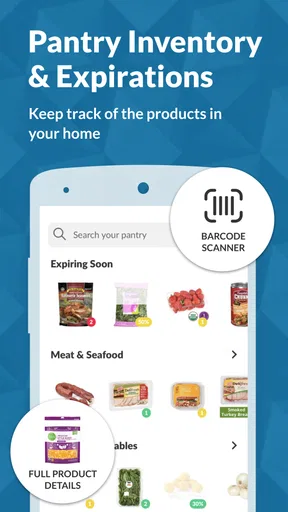
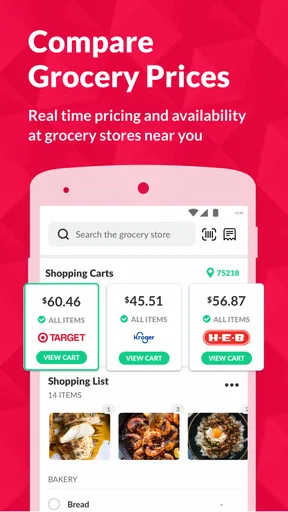
As soon as I downloaded Cooklist on my phone, I was impressed by its clean and intuitive interface. The setup process is straightforward. You start by adding items to your pantry, either by scanning barcodes or manually entering them. The app syncs with local grocery stores, pulling in pricing and availability, which is a nifty feature if you’re planning a shopping trip.
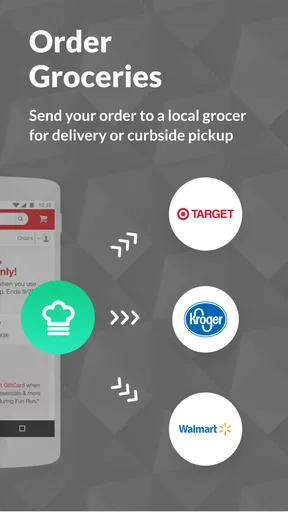
The app also connects with online grocery services, allowing you to keep your pantry updated with real-time data. This feature is perfect for avoiding those annoying moments when you realize you’re out of a crucial ingredient halfway through cooking.
Cooking Up a Storm: Meal Planning and Recipes
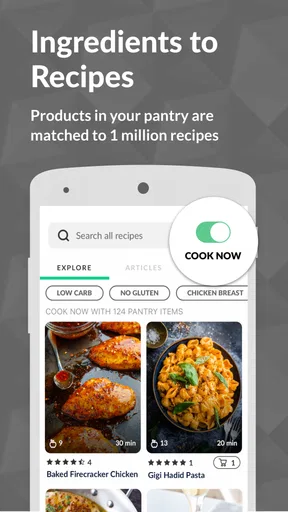
If you’re anything like me, deciding what to cook every day can be a chore. But with Cooklist, the app suggests recipes based on what’s already in your pantry. It’s a fantastic way to minimize food waste and make sure nothing goes unused.
The recipe suggestions are diverse and cater to various dietary needs, whether you’re vegan, gluten-free, or on a keto diet. You can even set your dietary preferences in the app, which is a thoughtful touch for those with specific eating habits.
Worth Reading Before You Choose

EA SPORTS FC Mobile 26 Is a Bigger Football Game, but It Takes Time

Flipboard Shows What News Apps Must Do Beyond the Feed

Switching to Android Auto Means Rethinking Your Driving Routine

Google Calendar Makes a Crowded Week Easier to Manage

Ludo King Makes the Most of the Minutes Between Plans

Baby Panda World Brings Quick Play to Modern Phones, but Its Game Library Feels Busy
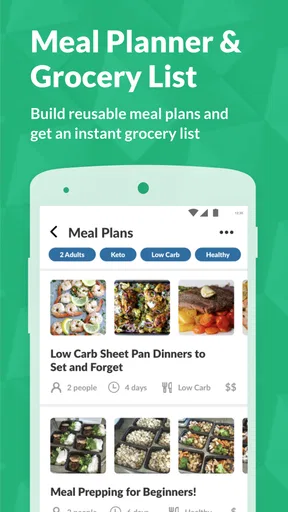
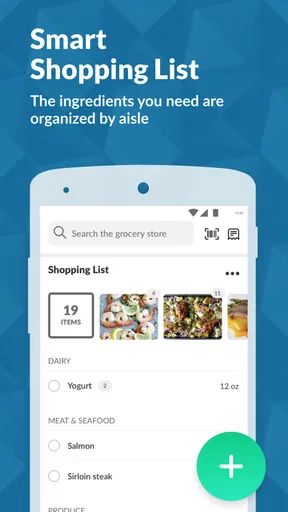
One of my favorite features is the meal planner. You can plan your meals for the week, and Cooklist will automatically generate a grocery list for the missing ingredients. It’s like having a personal meal planner without the hefty price tag!
Making the recipe suggestions work in a real kitchen
The most useful way I found to approach recipe recommendations is to treat them as a starting point, not a promise that every ingredient is already covered. Pantry records are only as accurate as the last time you updated them, and a recipe may still call for something you don’t keep on hand. Before committing a meal to the week, I’d check the ingredients and decide whether the missing items are worth buying or whether another suggestion suits the cupboard better.
That small check also helps when you’re cooking around dietary preferences. Setting a preference can narrow the choices, but I would still read each recipe rather than assume every suggestion fits a particular need perfectly. For anyone managing a strict dietary restriction, that extra review is more important than convenience.
Pantry Management: Keeping It Stocked
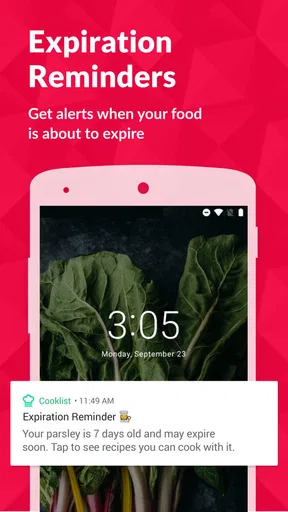
The pantry management feature is where Cooklist really shines. It’s like a digital inventory for your kitchen. You can track expiration dates, set reminders for when items are about to go bad, and even find recipes to use them up in time.
Imagine never again finding a mystery can at the back of your cupboard that’s been expired for years. Cooklist makes it super easy to keep tabs on everything, reducing food waste and saving you money in the long run.
Keeping inventory useful without turning it into a chore
A complete inventory sounds ideal, but entering every ingredient and keeping quantities accurate can become its own household task. I’d begin with the foods that regularly get forgotten or wasted: pantry staples you buy repeatedly, opened items you want to use soon, and ingredients that can anchor a meal. There’s less value in meticulously recording every spice if the extra upkeep makes you stop using the app.
It also helps to update the list at natural moments instead of trying to remember everything later. After unpacking groceries, adding the items most likely to affect upcoming meals can make recipe suggestions more relevant. When something gets used up, removing it matters too; otherwise, the app may lead you toward a recipe based on an ingredient that isn’t really there. This is a practical trade-off: the inventory can guide decisions, but it cannot replace a quick look in the cupboard.
Shopping Made Easy: Grocery Integration
Shopping for groceries is now a breeze. Cooklist integrates with popular grocery services, allowing you to compare prices and shop directly from the app. The shopping list feature is dynamic and updates in real-time as you add or remove items from your pantry.
You can also share your shopping list with family members, making it easy to delegate tasks or ensure everyone is on the same page. It’s like having a shared shopping assistant for the whole household.
Where grocery integration helps—and where a simple list wins
Grocery connections can make the step from meal idea to shopping more convenient, especially when you already use a supported service. Still, I would check the final list before ordering or heading out: a generated list is a useful draft, not a guarantee that every item, quantity, or preferred substitute is right for your household. Store availability and prices can also change, so I wouldn’t plan a tight budget around an estimate without checking the current shop.
Compared with a basic notes app or a paper list, Cooklist offers a more connected route from pantry to recipe to groceries. A plain list is faster if all you need is a few items and you don’t want to maintain an inventory. Recipe-book apps, meanwhile, can be better for someone who mainly wants to collect and browse recipes. Cooklist makes most sense when you want those activities to inform one another, rather than manage them separately.
A weeknight example that shows the app’s value
Picture getting home with little time to think about dinner. If you’ve kept the pantry reasonably up to date, you can look for a recipe that uses ingredients already available, choose one that suits your preferences, and add only the missing items to the shopping list. That is a more useful chain than simply browsing recipes: it can help avoid buying duplicates and give an overlooked ingredient a purpose.
The same approach works for planning ahead. I’d choose meals first, then review the combined shopping needs before making a trip, rather than treating every recipe suggestion as a separate shopping mission. It’s a small change in workflow, but it makes the planner more practical and helps keep impulse additions from defeating the point of using what’s already at home.
Final Thoughts: Is Cooklist for You?
So, is Cooklist worth downloading? I’d say it is worth trying if meal planning, pantry tracking, and grocery lists are problems you want to solve together. Whether you’re a seasoned cook or just starting out, the app’s features are tailored to help you manage your kitchen better.
From reducing food waste to simplifying meal planning, Cooklist offers a comprehensive suite of tools that cater to all your cooking needs. It’s a great investment for anyone looking to streamline their grocery shopping and meal preparation process.
In a world where convenience is king, Cooklist stands out as a must-have app for anyone who loves cooking and wants to make the most out of their pantry. Give it a try, and you might just find yourself wondering how you ever managed without it!
Who is most likely to get lasting value?
I think it’s best suited to people who cook at home regularly, want help turning existing ingredients into meal ideas, and are comfortable spending a little time maintaining a digital pantry. It can also be handy for a household where more than one person shops, since a shared list can reduce the familiar back-and-forth about what still needs buying.
On the other hand, I’d skip it if you rarely cook, already have a reliable routine with a simple shopping list, or don’t want to log pantry items. People who need highly exact inventory or strict control over every ingredient should also verify recipes and stock themselves rather than rely on an app’s record as definitive. Those trade-offs matter more than the promise of an all-in-one kitchen tool.
My buy-or-skip verdict
Because Cooklist is free to download, trying it is a reasonable way to see whether its connected planning approach suits you. The optional purchases make it worth checking what is included before spending, especially if your main need is only a grocery list. I’d give the free experience a fair test with a small, realistic pantry rather than entering the whole kitchen in one sitting.
My recommendation is to try it if you want recipes, meal plans, pantry notes, and shopping to work as one routine. If you only need a quick list, a notes app is simpler; if browsing and saving recipes is your priority, a dedicated recipe collection may fit better. Cooklist’s strongest case is for the person who wants to answer a practical question—what can I make with what I have, and what do I need to buy?—without starting that decision from scratch every night.
Pros
- Intuitive interface for easy navigation.
- Comprehensive recipe suggestions.
- Integrates with popular grocery stores.
- Tracks expiration dates automatically.
- Customizable meal planning features.
Cons
- Limited offline functionality.
- Some features require a subscription.
- Occasional syncing issues with stores.
- Notifications can be overwhelming.
- Recipe database needs more variety.
FAQs for Cooklist: Pantry & Cooking App
What is Cooklist and how does it work?
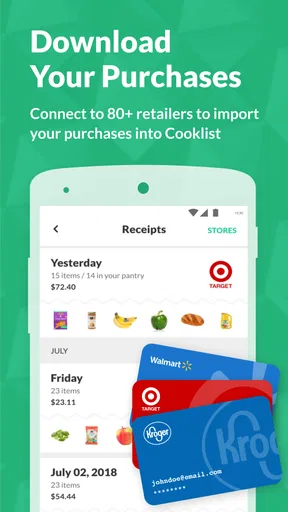
Cooklist is a comprehensive pantry and cooking app designed to simplify meal planning and grocery shopping. It connects to your grocery store accounts to track your purchases and suggests recipes based on the ingredients you have at home. This ensures you make the most out of your pantry and reduce food waste.
Can Cooklist integrate with my grocery store accounts?
Yes, Cooklist seamlessly integrates with many popular grocery store accounts. By linking your accounts, the app automatically imports your purchase history and provides personalized recipe recommendations. This feature helps streamline your meal planning and shopping experience, ensuring you always have the necessary ingredients on hand.
How does Cooklist help in reducing food waste?
Cooklist reduces food waste by tracking the expiration dates of items in your pantry and suggesting recipes that use ingredients nearing their expiration. By utilizing what you already have at home, the app encourages efficient meal preparation and helps prevent unnecessary grocery purchases.
Is Cooklist suitable for people with dietary restrictions?
Absolutely. Cooklist offers customizable settings to accommodate various dietary preferences and restrictions, such as vegetarian, vegan, gluten-free, and more. You can filter recipes based on your specific needs, ensuring that all meal suggestions align with your dietary requirements.
Does Cooklist provide nutritional information for its recipes?
Yes, Cooklist provides detailed nutritional information for each recipe. This includes calorie count, macronutrients, and other essential dietary data. This feature is particularly useful for those who are health-conscious or managing dietary restrictions, allowing users to make informed decisions about their meals.


